在使用 Visual Studio 編輯器的搜尋功能時,一般我們會透過文字模式進行比對,除此之外,更可以透過 Regex 比對模式,完成較複雜的搜尋需求。
使用 Regex 搜尋功能時,還可以使用「擷取群組」,取得目標字串中的子字串,然後使用 $1 $2 $3 … 將子字串套用到取代字串中的特定位置。
範例一 使用 regex 搜尋取代
1-1
下面範例中,我們想要移除所有 c# 標籤中的 style 屬性內容。
Find:(style)\s*=\s*\"(.*)\"
Replace:
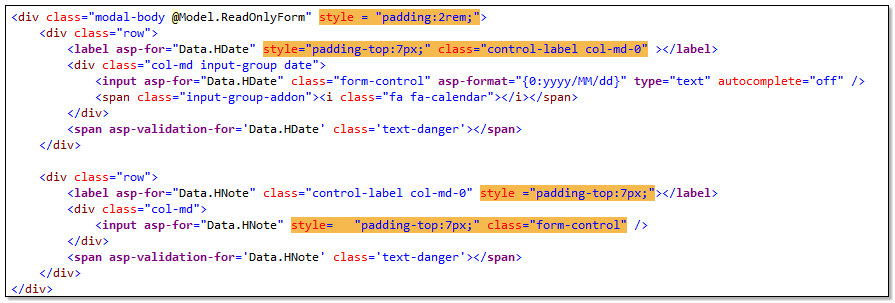
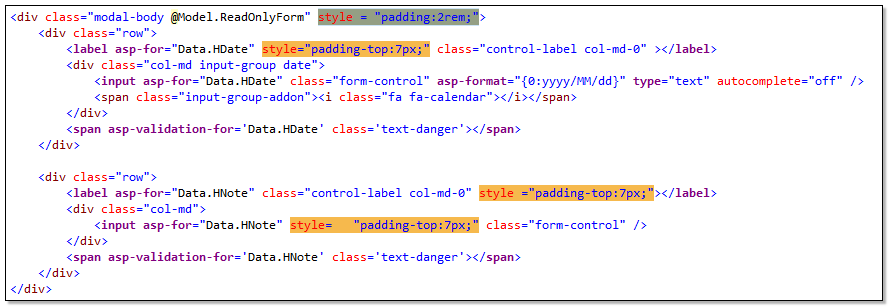
上面搜尋到的結果,連同 class 屬性都包含了,所以調整 Regex 搜尋式子,加上?,使用不貪心尋找,避免找到的範圍過大。
(style)\s*=\s*\"(.*?)\"
Replace:
1-2
底下例子,若我們想將DropDownList那5行程式碼改成同一行。
Find:  \@Html\.DropDownList\(\r\n(.+?)\r\n(.+?)\r\n(.+?)\r\n(.+?\))
Replae:  @Html.DropDownList($1 $2 $3 $4)
//取代前
@Html.DropDownList(
            "Data.TaxType",
            ViewBag.TaxType_SelectList as List<SelectListItem>,
            c#Attributes: new { @class = "form-select" }
            )
//取代後
@Html.DropDownList("Data.TaxType", ViewBag.TaxType_SelectList as List<SelectListItem>, c#Attributes: new { @class = "form-select" }))
範例二 Capture Groups & Replacement Patterns
利用 regex 在搜尋目標中,以群組方式找尋比對目標,再將搜尋到的子字串,套用到取代字串的樣版中。
下段 regex ,我們將 . " @ { } ( ) < > 這些符號當成群組內的搜尋內容,若有搜尋到目標,就可以使用 $1 符號,穿插到取代結果裡。
底下例子,搜尋這些符號,然後在所有符號前加上\符號。
Find:  ([."@{}()<>])
Replae: \$1
//取代前
@Html.DropDownList("CompanyId", ViewBag.Company_SelectList as List<SelectListItem>, htmlAttributes: new { @class = "form-select", @style = "z-index:99999" })

//取代後
\@Html\.DropDownList\(\"CompanyId\", ViewBag\.Company_SelectList as List\<SelectListItem\>, htmlAttributes: new \{ \@class = \"form-select\", \@style = \"z-index:99999\" \}\)
範例三 多組搜尋群組與取代子字串
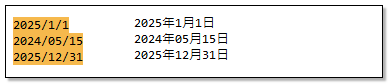
群組搜尋也可以設定多組,若有搜尋到目標,就可以使用 $1 $2 $3 … 符號,穿插到取代結果裡。 下面例子中,我們想找出日期格式 yyyy/mm/dd 中的年月日數值,然後取代成 yyyy年yy月dd日
Find:(\d{4})\/(\d{2})\/(\d{2})
Replace:$1年$2月$3日
範例四
下面程式碼是 ASP.NET MVC razor view 中常見的表示法,若我們想將 Html Helper 改成 Tag Helper 寫法,可以這麼做:
4-1
Find:\@Html\.LabelFor\(m =\> m\.(.+?), c#Attributes: new \{ @class = \"(.+?)\", \@style = \"(.+?)\" \}\)
Replace:<label asp-for="$1" class="$2" style="$3"></label>
//取代前
@Html.LabelFor(m => m.Data.EffectiveDate, c#Attributes: new { @class = "control-label col-md-0", @style = "padding-top:7px;" })

//取代後
<label asp-for="Data.EffectiveDate" class="control-label col-md-0" style="padding-top:7px;"></label>
4-2
Find:  \@Html\.DropDownList\(\"(.+?)", ViewBag\.(.+?) as List\<SelectListItem\>, c#Attributes: new \{ \@class = \"(.+?)\", \@onchange = \"(.+?)\" \}\)
Replae: <select asp-for="$1" class="$3" asp-items="ViewBag.$2" onchange="$4"></select>
//取代前
@Html.DropDownList("Data.PrtTypeId", ViewBag.PrtTypeId_SelectList as List<SelectListItem>, c#Attributes: new { @class = "form-select", @onchange = "GetCategoryB();" })
//取代後
<select asp-for="Data.PrtTypeId" class="form-select" asp-items="ViewBag.PrtTypeId_SelectList" onchange="GetCategoryB();"></select>